Both Claude Code and OpenAI's Codex work very well inside VS Code, and the choice between them is mostly a matter of taste, existing accounts, and which conventions your collaborators/workplace already use. This guide focuses on Claude Code, but a companion Codex guide covers the same ground for Codex, and a side-by-side comparison walks through the practical differences. Pick whichever fits your workflow.
VS Code is one of several places these tools can run — see where to run agentic AI for a five-minute tour of the alternatives (terminal, desktop app, web, mobile) before committing to a setup.
Setup
Installation in 5 Steps
Installing Claude Code in VS Code and getting started is straightforward.
Ctrl with Cmd throughout — e.g. Cmd+Shift+X for Extensions, Cmd+Shift+P for the Command Palette.
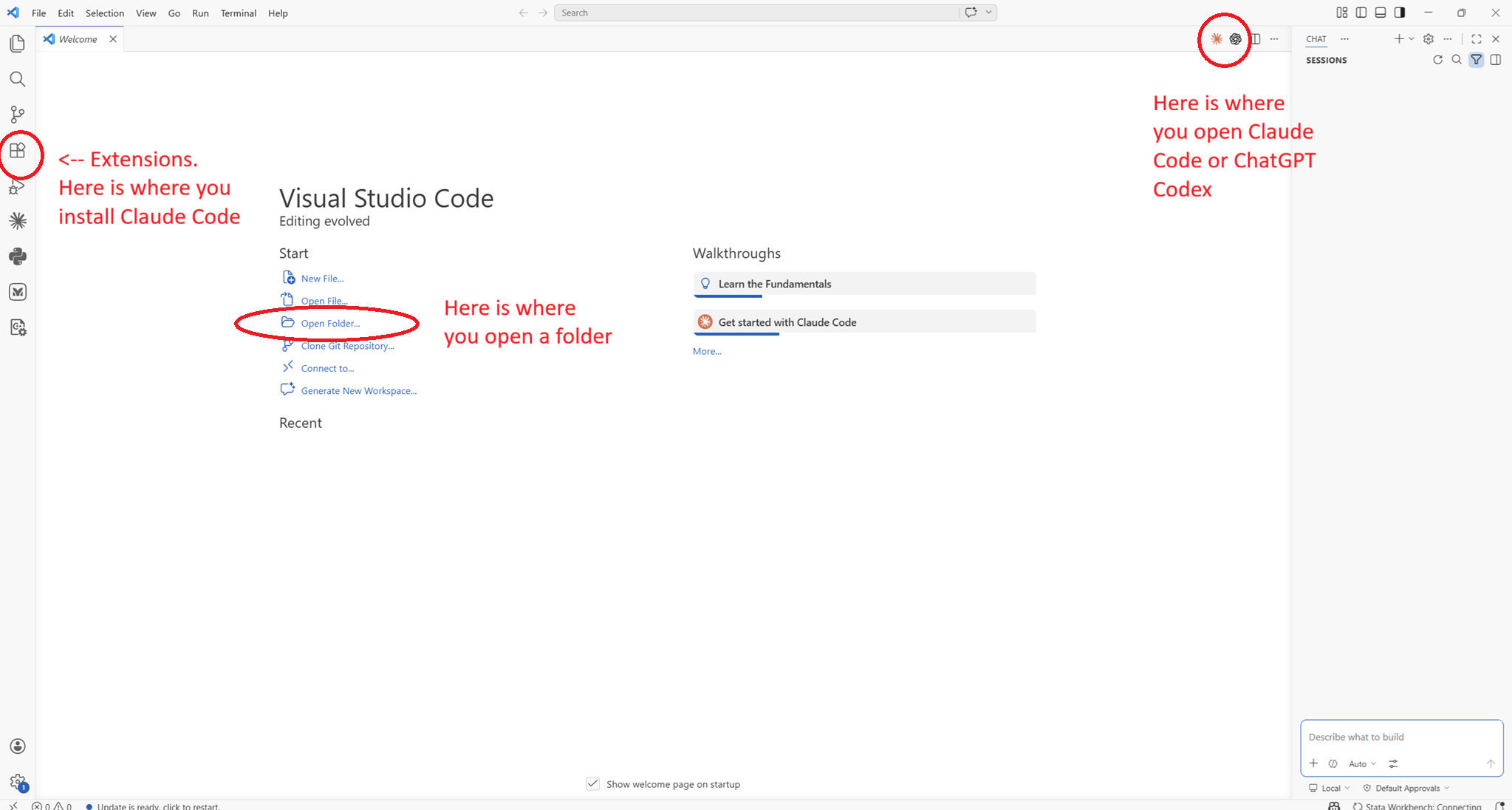
- Open VS Code and open the Extensions panel by pressing
Ctrl+Shift+X. - Search "Claude Code" and install the official Anthropic extension.
- Click the Claude icon (
 ) in the left sidebar or on the top right of a window pane.
 - Sign in with your Claude account or API key.
- Open your full project folder in VS Code (File → Open Folder), not just a single file. Claude needs the whole directory tree to be useful. This can be any folder on your computer — a git repository, a Dropbox folder, or a plain folder on your desktop all work equally well.
Claude Code: Open Walkthrough from the Command Palette (Ctrl+Shift+P) for a quick interactive tour of the basics.
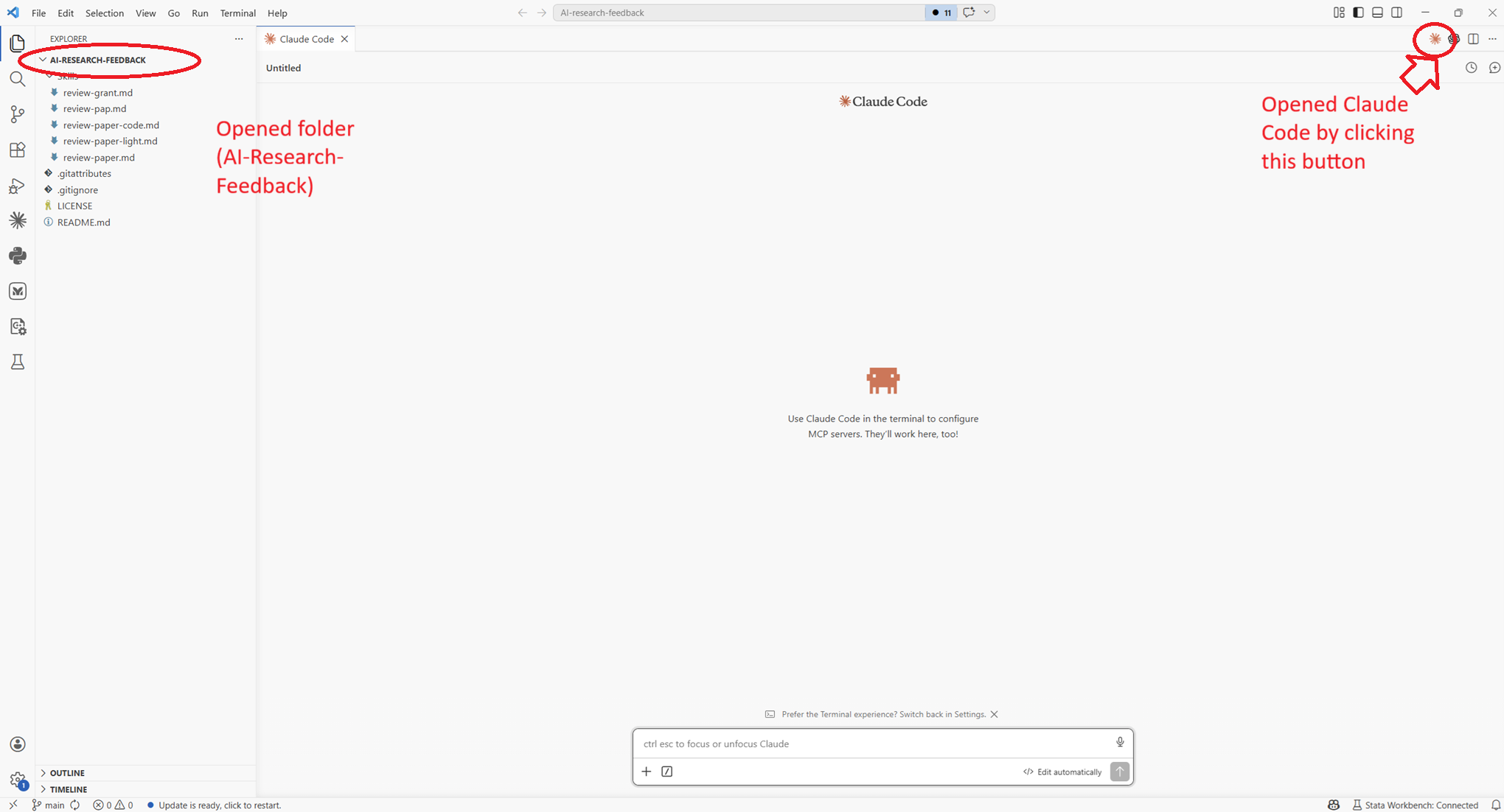
Change my VS Code theme to light. It can switch themes for you without needing to navigate the settings menu. If you want to change the theme manually, open settings and themes and choose a light theme.
Next
After Installing — What to Do Next
Claude Code works out of the box, but a few one-time setup steps make it dramatically more useful for empirical research. Everything below is covered in detail in the sections that follow — this is the short roadmap.
- Install the extensions for your research stack. Stata, Python, LaTeX, CSV viewers — Claude reads what's installed and can run code, render tables, and preview PDFs directly in the editor.
- Create a
CLAUDE.mdfile for each project. Tell Claude once about your data, sample definitions, and coding conventions. It reads this at the start of every session so you never have to repeat yourself. - Add skills for the workflows you repeat. Turn a standard robustness check, a referee-style review, or a slide-deck build into a one-line slash command you can invoke in any project.
Recommended Extensions
A Starter Pack for Economists
Install these alongside Claude Code to cover the full research stack. Search for each by the extension ID in the Extensions panel (Ctrl+Shift+X).
Stata
Python
.py files. Required for anything Python-related..docx to markdown, reshaping a messy CSV, scraping a table from a webpage, pulling a series from an API, cleaning a bibliography file, splitting a 200-page document into chapters — is solved most quickly by a ten-line Python script. You don't need to know the language to benefit. Ask Claude Code in plain English ("convert this PDF to markdown, keep the tables", "download monthly CPI from FRED and save as CSV"), and it will write, run, and debug the script for you. Installing the Python extensions above is what makes that path smooth: Claude can execute scripts, see the errors, and iterate without you having to set anything up. Think of Python less as a language you need to learn and more as a general-purpose glue that Claude uses on your behalf.
LaTeX
Data Files
RBQL) for filtering rows without loading into R or Python. Very useful for quickly sanity-checking raw data files.latex-workshop leaves a trail of auxiliary files (.aux, .bbl, .log, .fls, .fdb_latexmk, …) next to your .tex source. To have VS Code delete them automatically after each successful build, add three settings to your .vscode/settings.json:
"latex-workshop.latex.autoClean.run": "onBuilt",
"latex-workshop.latex.clean.method": "glob",
"latex-workshop.latex.clean.fileTypes": [
  "*.aux", "*.bbl", "*.blg", "*.log",
  "*.out", "*.toc", "*.fls", "*.fdb_latexmk",
  "*.nav", "*.snm", "*.vrb"
]autoClean.run to "never" if you'd rather keep the aux files around (useful when debugging bibliography or cross-reference errors).
File Formats
What Claude Code Can Read — and What to Convert First
Claude Code works best with plain text. The more a file looks like characters-on-a-page (as opposed to a rendered binary), the better Claude can read, edit, and reason about it. For economists this has practical consequences: a referee report in .docx or a codebook as a scanned PDF are both usable, but giving Claude a text version of the same file produces noticeably better results.
A markdown file (.md) is the simplest useful form of this: a plain-text document with lightweight formatting conventions — # for headings, *italic*, **bold**, bullet lists, and links written as [text](url) — that renders into nicely formatted output but stays fully readable and editable as raw text.
A rough guide to how Claude handles the formats you're most likely to encounter:
.md, .txt, .tex, .bib, .csv, .json, .yaml
.py, .R, .do, .jl, .sh
stata-workbench extension set up..ipynb
.ipynb or when you want exploratory analysis and prose side by side..docx
.docx files, but formatting, comments, and tracked changes often come through awkwardly. For referee reports or co-author comments, convert to markdown first with pandoc file.docx -o file.md. Claude can do this for you — just ask..xlsx, .xls
.dta, .rds, .sav
export delimited, R readr::write_csv, or Python pyreadstat) to dump the dataset, a sample, or a summary to CSV or markdown..png, .jpg, figures
.qsf
.qsf format is technically JSON but deeply nested and hard to read. Ask Claude to write a short script that flattens it into a markdown outline of blocks, questions, and answer choices — much easier to evaluate.Handling PDFs
PDFs are where most researchers get stuck. They look like documents, but under the hood they are a layout format, not a text format — the "text" is often a sequence of glyphs positioned on a page, with no inherent notion of paragraphs, columns, or tables. Claude Code can read PDFs, but results vary enormously depending on how the PDF was produced.
A practical rule of thumb:
(from LaTeX, Word, etc.)
(50+ pages)
(image-based)
ocrmypdf is a good free option), then convert the OCR'd PDF to markdown..tex, use that instead — it will always be cleaner than re-parsing the compiled PDF.For converting PDFs to markdown, a few options work well:
pandoc paper.pdf -o paper.md. Works best on clean, born-digital PDFs.Customisation
CLAUDE.md and Skills
CLAUDE.md — Persistent Project Context
A CLAUDE.md file at your project root is read automatically at the start of every Claude Code session. It's the place to tell Claude things that are always true about your project — conventions, variable naming, dataset structure, what not to touch — so you don't have to repeat them in every prompt.
The easiest way to create one is to type /init in the Claude Code panel. Claude will read your project folder and generate a draft CLAUDE.md automatically — inferring file structure, languages, and conventions. Review and edit the result before using it. Alternatively, create the file manually. A useful starting point for an empirical project:
# Project: [Paper title]

## Data
- Unit of analysis: firm-year panel, 2010–2022
- Raw data lives in data/raw/ — never edit these files
- Main dataset after cleaning: data/clean/panel.dta (N ≈ 47,000)

## Code conventions
- R scripts are numbered (01_clean.R, 02_analysis.R, ...)
- All regressions cluster SEs at the firm level
- Use fixest for all panel regressions

## LaTeX
- Main file: paper/main.tex
- Tables generated by 03_tables.R go to paper/tables/
- Use \widehat{} not \hat{} for estimators
CLAUDE.md files work at two levels, and both are loaded simultaneously:
~ is shorthand for your home folder — on Mac/Linux this is /Users/yourname/.claude/, on Windows it's typically C:\Users\yourname\.claude\. Note that folders starting with . are hidden by default; use Cmd+Shift+. on Mac to show them in Finder.When you open a project, Claude reads both files. The folder-level file takes precedence if there's any conflict.
Skills — Reusable Workflows as Slash Commands
Skills are markdown instruction files that become /slash-commands you can invoke in the Claude panel. When you type /skill-name, Claude loads the instructions and executes them — useful for repetitive tasks you run across projects, like a standard robustness check or reformatting a regression table.
Skills live in one of two places:
Each skill is a folder containing a SKILL.md file. The folder name becomes the slash command. To create a /robustness command:
mkdir -p ~/.claude/skills/robustness
# then create ~/.claude/skills/robustness/SKILL.md
A minimal SKILL.md for an economist:
---
name: robustness
description: Run standard robustness checks on the main regression.
---

For the main specification in this project:
1. Re-run with alternative clustering (industry-year instead of firm)
2. Re-run dropping the top and bottom 1% of the outcome variable
3. Re-run on the pre-2020 subsample only
4. Produce a summary table comparing coefficients across all specs
Downloading Skills Others Have Written
There is a growing community library of shared skills. Copy any SKILL.md folder into ~/.claude/skills/ and it becomes available immediately as a slash command.
For economists specifically, a few starting points that are already in use in the field:
/beautiful_deck, which turns notes or a draft outline into a clean, presentation-ready deck, alongside other workflow tools worth browsing./done for wrapping up a session and logging what changed. Useful as a model for how a working economist structures daily Claude Code use.disable-model-invocation: true to the frontmatter.
Version Control
Git Integration
Claude Code is git-aware. When you open a project that is a git repository, Claude can see your commit history, staged changes, and diffs — without you having to paste anything. This makes it useful for version control tasks alongside coding ones.
Write a commit message for my staged changes.Summarise what changed between the last two commits
in 02_analysis.R.I have a merge conflict in 03_tables.R. Read both
versions and resolve it, keeping the more recent
variable names.Performance
Managing the Context Window
Claude can only hold a limited amount of text in its working memory at once — roughly equivalent to a few hundred pages. For large empirical projects with many scripts and data files, this fills up quickly, and performance degrades as it approaches the limit. A few habits help:
Rather than letting Claude read everything, point it at the specific file you're working on.
@02_analysis.R fix the clustering in the main spec.Each new conversation in the Claude panel is a fresh context. Click the + button at the top of the Claude panel to start one, or type /clear to reset the current conversation — rather than continuing a long one for an unrelated task.
Type /context in the panel to see a breakdown of how your context window is being used and how much space remains.
CLAUDE.md at the start of each session, you don't need to re-explain your project structure in every conversation — keeping prompts short and context usage low.