AI coding agents in VS Code

Codex vs Claude Code

A practical comparison for researchers choosing between OpenAI Codex and Anthropic Claude Code in VS Code.

Both tools can read a project, edit files, run commands, review diffs, and help with R, Stata, Python, LaTeX, and data-cleaning glue code. The real differences are in workflow: where instructions live, how reusable workflows are invoked, how permissions are managed, and how local work connects to cloud work.

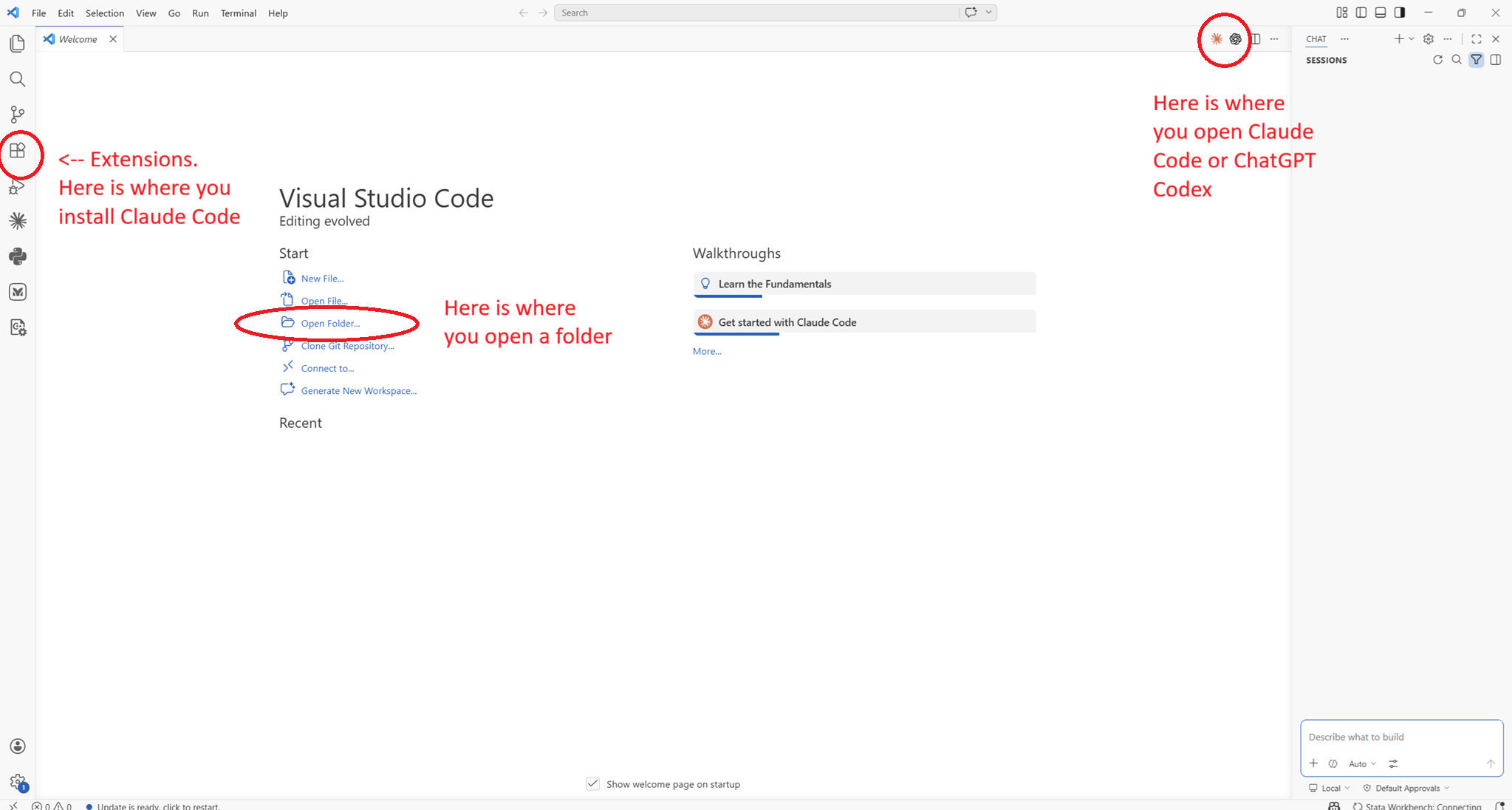
Annotated Visual Studio Code screenshot showing extensions, open folder, and AI assistant icons
Same editor, different agent ecosystems. The practical differences show up after installation.

The difference in one paragraph

Use Codex when you want a ChatGPT-connected coding agent that moves naturally between local IDE work, cloud tasks, GitHub-style delegation, explicit reasoning effort, and an OpenAI-style skills/plugins ecosystem. Use Claude Code when you prefer Anthropic's Claude models, its mature .claude workflow, rich slash-command tradition, detailed permission modes, auto memory, and a VS Code extension that emphasizes plan review and checkpoints.

This page is a workflow comparison, not a model benchmark. The best choice often depends less on abstract model quality and more on which tool fits your folder structure, data restrictions, collaborators, and habits.
Codex OpenAI
  • Project instructions: AGENTS.md
  • Reusable workflows: $skills in .agents/skills/
  • IDE slash commands: /cloud, /local, /review, /status
  • Modes: Chat, Agent, Agent (Full Access)
  • Strong local-to-cloud handoff across IDE, CLI, web, and GitHub
Claude Code Anthropic
  • Project memory: CLAUDE.md, auto memory, and rules
  • Reusable workflows: /skills and legacy custom commands
  • Built-in slash commands include /init, /memory, /permissions, /compact
  • Permission modes: default, acceptEdits, plan, bypassPermissions
  • Deep VS Code interface with plan review, checkpoints, tabs, terminal context, and MCP

The parts that change your day-to-day use

Area
Codex
Claude Code
Project instructions
AGENTS.md. Codex reads global and project instruction files before doing work. It can layer root and nested instructions, with closer files taking precedence.
CLAUDE.md. Claude Code starts each session with persistent memory files and can also use auto memory and path-specific rules.
Reusable workflows
$skills. Mention a skill such as $robustness, or let Codex choose one when the skill description matches. Skills usually live in .agents/skills/ or ~/.agents/skills/.
/skills. Claude skills are invoked like slash commands, such as /robustness, and live in .claude/skills/. Existing .claude/commands/ files keep working.
Slash commands
Codex IDE slash commands are mainly controls: switch local/cloud, start review mode, toggle auto context, or show status.
Claude Code has a broad command surface: initialize memory, compact context, edit memory, manage permissions, choose model, inspect status, review code, and more.
Approvals and safety
Codex exposes a simpler mode switch in the IDE: Chat, Agent, and Agent (Full Access). The default agent mode can edit and run commands in the working directory, while asking before network or outside-directory work.
Claude Code has more named permission modes and fine-grained allow, ask, and deny rules. This is powerful for teams that want policy-like control.
Cloud work
Codex foregrounds cloud delegation. From the IDE you can send larger jobs to a cloud environment, monitor progress, and apply diffs locally. This local-to-cloud handoff is Codex's clearest differentiator.
Claude Code is primarily local in VS Code. Anthropic also offers web, desktop, and terminal surfaces, but the IDE extension emphasizes native interactive work and resumable conversations rather than cloud handoff.
Subagents
Codex supports explicit subagent workflows and custom agents, with subagent activity primarily surfaced in the app and CLI today.
Claude Code supports specialized subagents with their own context, prompts, tools, and permissions, and can delegate when a task matches a subagent's expertise.
Hooks and automation
Codex hooks run deterministic scripts during lifecycle events, currently behind a codex_hooks feature flag in config.toml.
Claude Code hooks are a mature automation surface, with many lifecycle events and support for shell commands, HTTP endpoints, and prompt/agent hooks.
VS Code feel
Codex is a side panel that shares configuration with the CLI, supports file mentions, model/reasoning switching, approval modes, cloud delegation, web search, and images.
Claude Code's VS Code extension is a native graphical interface with inline diffs, @-mentions including selected line ranges, plan review, checkpoints, conversation history, and multiple conversation tabs.
What the differences mean for economists

Empirical projects

Both tools can help clean data, run scripts, debug regressions, and write tables. The crucial setup is the same: open the whole folder, keep raw data protected, and store project conventions in a persistent instruction file.

Private data

Use local workflows for restricted data. Codex's cloud handoff is convenient for general code tasks, but administrative or confidential data usually belongs in local-only workflows with explicit approvals.

Co-author consistency

Codex favors AGENTS.md; Claude Code favors CLAUDE.md. If a team uses both, keep a shared source of truth and mirror the important parts into both files.

Repeatable checks

A robustness checklist becomes $robustness in Codex and /robustness in Claude Code. The instruction content can be nearly identical, but the folder paths and invocation syntax differ.

Long-running refactors

Codex is especially natural when you want to delegate a larger codebase task to the cloud or parallelize with explicit subagents. Claude Code is especially natural when you want tight local review with rich permission modes.

Writing and LaTeX

Both are useful for prose, notation, tables, and bibliography fixes. Put writing preferences in project instructions, and keep source files in markdown or LaTeX rather than asking the agent to infer from PDFs.

Which one should you use?

Codex is the better fit when...

  • Your workflow already lives in ChatGPT or OpenAI accounts.
  • You want a strong local-to-cloud path for larger coding tasks.
  • You prefer AGENTS.md and OpenAI-style skills/plugins.
  • You want explicit reasoning-effort controls in the IDE.
  • You expect to use Codex from IDE, CLI, web, GitHub, and mobile-style surfaces.

Claude Code is the better fit when...

  • Your workflow already uses Anthropic accounts or Claude subscriptions.
  • You want a very mature VS Code interface with plan review and checkpoints.
  • Your team already has CLAUDE.md, .claude/skills/, or .claude/commands/.
  • You want detailed permission modes and rules as part of the everyday workflow.
  • You like custom slash commands and a large command surface inside the agent chat.
Practical recommendation: keep both installed for a while if your budget allows. Use one as your daily driver, then use the other as a second opinion for reviews, refactors, or papers where a fresh model perspective helps.

If you are moving a guide from Claude Code to Codex

The conceptual pieces transfer well, but the file names and invocation style change.

Project memory

Move the durable project context from CLAUDE.md into AGENTS.md. Keep facts, not chatty prose: data location, sample definitions, script order, table destinations, and what not to edit.

# Claude Code
CLAUDE.md

# Codex
AGENTS.md

Reusable workflows

Convert Claude slash skills into Codex skills. The core instructions can stay similar, but the Codex directory and invocation syntax change.

# Claude Code
.claude/skills/robustness/SKILL.md
/robustness

# Codex
.agents/skills/robustness/SKILL.md
$robustness

Permissions

Translate Claude's detailed permission-mode discussion into Codex's simpler IDE modes: Chat for advice, Agent for ordinary local work, and Agent (Full Access) only when you deliberately want broad autonomy.

Commands

Do not map every Claude slash command one-to-one. Codex IDE slash commands are mostly session controls. Put reusable research procedures into skills instead.

Official docs used

These details change quickly. This page was written from official docs checked on May 12, 2026.