Overleaf is great for collaboration but limited as an editor: no Copilot, no Claude Code, no Codex, no proper diffing, no terminal. The fix is to write locally in VS Code and let Overleaf stay in sync with what you produce. Two routes work well, and both require Overleaf Premium - some universities provide this for free through your institutional login. For the AI tooling that makes the local workflow worth it, see the Claude Code guide and the Codex guide.
Which route?
GitHub or Dropbox
If you ever want to git log your paper, use GitHub. If your coauthor is editing in Overleaf at the same time you are typing in VS Code, use Dropbox. The table summarises the practical differences.
Setup A
GitHub via GitHub Desktop
Writing a paper is hard enough without also debugging git from a terminal. GitHub Desktop gives you a clickable interface for everything you need - commit, push, pull, branch - without learning the command line. That is the default I would recommend. If you are already comfortable running git from the terminal, the same workflow works with the CLI; just substitute the obvious commands at each step. Use whichever feels less distracting from the actual writing.
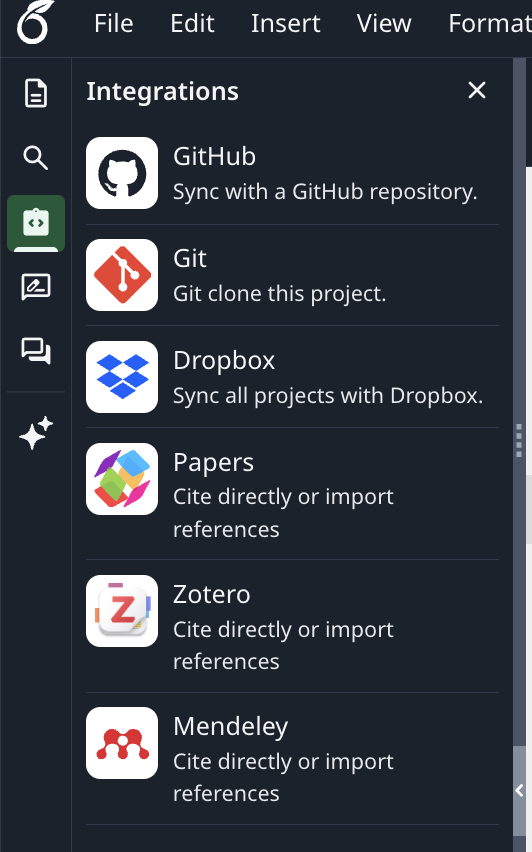
- In Overleaf, open the project and look in the menu on the left. Choose Integrations → GitHub → Export Project to GitHub, fill in the details, and click Create a GitHub Repository.
- Install GitHub Desktop and sign in. Click File → Clone repository, pick the repo Overleaf just created, and choose a local folder.
- Open that folder in VS Code. Install the LaTeX Workshop extension if you want local preview and compilation.
- Workflow: edit in VS Code, switch to GitHub Desktop, write a short summary, click Commit to main, then Push origin.
- Back in Overleaf, look in the menu on the left and click on Github → Pull GitHub changes into Overleaf to bring your edits in.
- The reverse direction (coauthor edits in Overleaf), click Github in the menu on the left → Push Overleaf changes to GitHub
.gitignore. When GitHub Desktop sets up the repo, accept the TeX template. It keeps compiled output (.pdf, .aux, .synctex.gz, etc.) out of the repo so the history stays clean. You can ask Claude Code or Codex to edit your .gitignore.
Setup B
Dropbox
Dropbox is the lighter-weight option. There is no commit step - whatever you save in VS Code shows up in Overleaf within seconds, and edits made in Overleaf flow back the same way. Good for active coauthoring; less good if you want a paper trail.
- Install Dropbox on your machine and let it finish its initial sync.
- In Overleaf, go to the menu on the left → Dropbox Sync → Link. Overleaf creates an
Apps/Overleaf/folder in your Dropbox containing one subfolder per project. - Open that project folder in VS Code and edit as normal. Each save propagates to Overleaf within seconds.
- Compile in Overleaf as usual, or locally with
latexmk -pdfif you have a working TeX installation.
Gotchas
Things That Will Catch You Out
- Dropbox notifications can be noisy. The auto-sync produces frequent update messages - this is the reason I switched to GitHub.
- The first sync overwrites. Make sure the Overleaf project and the linked GitHub repo / Dropbox folder agree on initial contents before linking. If one side is empty, the other side wins - and that direction is not always the one you expect.
- GitHub sync is not instant. Overleaf only pulls when you click. Tell coauthors to hit Pull GitHub changes after you push.
- Local compilation may need extra packages. Overleaf ships a large TeX Live install; if your paper compiles on Overleaf but not locally, install missing packages with
tlmgr install <name>. - Figure paths must stay inside the project. Overleaf does not allow parent-directory references like
\includegraphics{../Figures/fig1.pdf}- keep figures in a subfolder of the project root. - Dropbox conflicts are silent. If two people edit the same file at the same time, Dropbox creates a
filename (conflicted copy).texrather than warning you. Skim the project folder occasionally.
Why this matters
Pairing With AI Tools
Once your paper lives in a local folder, Claude Code, Codex, and Copilot can all read and edit the .tex files directly - rewriting paragraphs, fixing tables, chasing down referee comments, drafting cover letters. That is the whole point of the local detour. See the Claude Code guide and the Codex guide for setup, and the side-by-side comparison if you have not picked between them yet.